Showing posts with label Hardware. Show all posts

2014-02-18

The new processors and pop up ads

I just checked what impact the new Data Warehouse processors have had. I compared  the ETL-jobs we run in the Data Warehouse the week before and after the processor replacement. Duration (in wall clock time) dropped by 10 to 50 percent. It came as a surprise, I didn’t expect such a dramatic improvement. The jobs that thrives the best from the new processors are the jobs who spread out the work on parallel threads, that was no surprise though, since we increased the total server cores from 8 to 32 (including hyper-threading). The improvement is dramatic. When you need better performance, prop up the hardware before you start to optimize software :))
     
I just found out ads are popping up in my blog posts when I mention Intel processors in the heading. This is nothing I have asked for, but I do not mind as long as the ads are in line with my views on the world and my posts. I’m grateful for my ‘free’ blog and I realize someone has to pay in the end. As you can see I’m still happy.

2014-02-11

The Data Warehouse's new Intel E5 V2 Processors

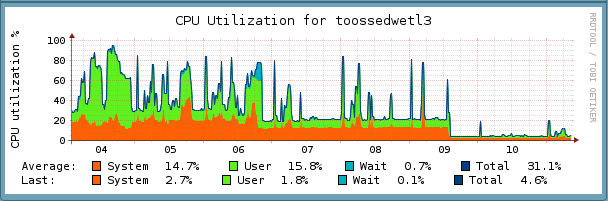
In a previous post I wrote about problems with the new infrastructure in the Data Warehouse, I had simply miscalculated the need for processor power. The original Intel XEON E5-2609 props were too weak. The virtual server that suffered the most was the ETL server, as you saw in the previous post the cpu consumption was high, even though we gave the ETL serve access to all four cores in the original prop the cpu consumption was a bit too high for my taste. Now we have replaced the old processor with a XEON E5-2670 v2 and gave the ETL server ten cores or threads. I think you can spot when we replaced the processor.


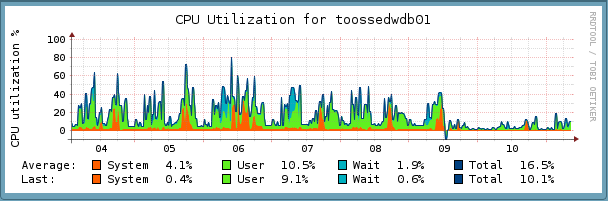
We could have used a somewhat simpler processor but the price difference was not big enough to consider a downgrade from XEON E5-2670 V2. The next image is the CPU utilization for the physical server hosting the ETL server. The time of replacement is equally evident here. From looking at those pictures you see a quite significant overhead for running the physical server, (I may interpret the figures wrongly).


While we replaced the processor of the physical application server, we decide to replace the processor for the database server as well. We choose a simpler six core processor XEON E5-2630 V2, which I think is perfect for the task. You see the effect of the replacement on the next image, it is as clear as the previous images.


This last replacement was not strictly necessary but the extra cost of updating this server was small. We want bios, firmware etc. to be the same version, the actual replacement was done in less than 30 minutes. But we struggled with the bios and firmware upgrade. I recommend Dell to invest in a software refresh, we actually struggled quite a lot before we had the bios and firmware updated. Otherwise these servers are great.


But what does these servers do?

For you who have missed it you can look at one day’s activity here, the video is boring I know, I been told I miss the ‘15 seconds’ generation completely. I suspect I miss everyone, but still it is a day’s night activity of the data warehouse.


p.s.

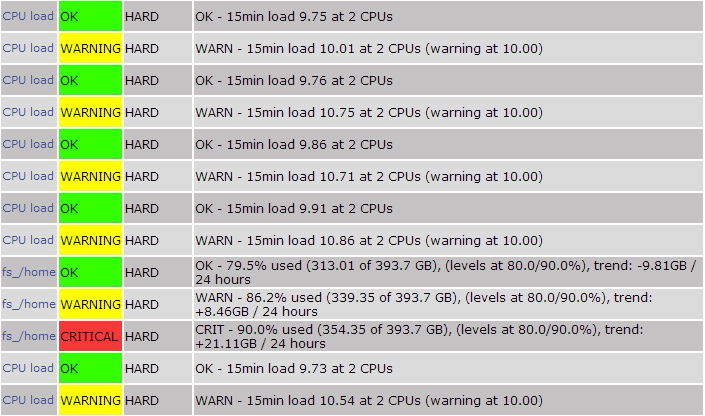
The pictures above are from Mathias Kettner's  check-MK built on top of Nagios. Really neat.

2013-11-30

PHP pcntl threads, Intel E5 VS2 & check-MK


During the writing of a series of posts on parallel scheduling of workflows in PHP, we have migrated an ETL application from my old physical server with an Intel I7 8 core processor to a virtual server in a Dell R720XD with a XEON E5-2609 4 core processor, and the ETL virtual server is assigned 2 CPUs. If you look at the CPU consumption within the ETL server it does not look very alarming.

You can see the server is working hard, but not that hard. I knew the E5-2609 was a weak processor for the load, but I figured it wouldn’t matter since the hard work is background processes run at night. If the jobs takes a bit longer no one would ever notice. But I was wrong, and I’m a bit embarrassed I should have known better. When you stress any kind of system things starts to happen, bad things. Computers, operating systems and programs are no exceptions.
I fork threads by PHP pcntl function and they failed random and silently in the new server. It is hell to debug these kind of failures where and why does failures occur, the root cause might not even be in the server since most threads communicate with remote ERP systems the prolonged execution time might trigger erratic behavior in those ERP systems or the communications layer or in the operating system or in … there are many many reasons parallel processes can go wrong, many more than single threaded processes. And I have to admit I run this in in PHP 5.6 RC2, yes I know you should not run production on RC versions, but that's just the way I am, early adopter and a bit lazy. During the Christmas holiday I will upgrade to a better PHP version, it’s not an easy task since I have to compile and link in some plugins, and do a lot of testing before I can switch. As a temporary circumvention we have moved the ‘biggest’ jobs back to the old server. Next week I will buy a new processor to the server. The good thing is I can have a much better processor than I could when I bought the server, now I choose between Intel XEON E5-2660 v2 and XEON E5-2670 v2, both of them are monster performers compared with the original E5-2609. The most important thing is the whopping 20 CPU’s these new processors can muster with hyper-threading. If I assign 10 processors to my ETL server, it will be more than sufficient. Then there is an interesting question, can I do the operation myself? I’m pretty experienced as a computer engineer, but I never tinkered with a rack server before. I’m not even sure I know how to get the server out of the rack. Anyway I do hope the thread failures will go away with the new processor. Debugging parallel processing is hard, swapping a processor is hopefully a clean simple operation.

The pictures above are from Mathias Kettner's check-MK built on top of Nagios. Really neat.


2013-09-08

Moving a Data Warehouse - 3

In some posts I have written about the migration of my Data Warehouse  from my own hardware to Dell servers. This move was partly initiated by my transition to a new job in the company, the management didn’t dare to run the Data Warehouse on the hardware I built .

When I originally designed the Data Warehouse infrastructure two key principles were low cost  and simplicity . I needed a database so I created a database server. I needed an ETL engine so I created an ETL server. Then I needed PhpMyAdmin so I created a PhpMyAdmin server. One function one physical server.  The only extra in my Irons was an extra Network Interface for an internal server network. And in the beginning servers were scrapped IBM desktops. I maximized RAM, replaced the hard disk and added a network interface, dirt cheap. Then I installed a Linux and one application, fired up the new server and forgot about it for two to five years. My servers were mostly replaced when I needed more capacity not due to hardware failures. One of very few hardware problems I have had is described here .

I avoid software tweaking and optimization, I try do do standard installs right from the distro, e.g. I choose ‘big’ for Mysql config file that’s is about how much tuning I do. I have all databases and indexes on the same disk! About half a terabyte database with about eight million queries a day ( I have seen peaks over 15 million queries a day), this is on a custom made server with 16GB RAM.

Now this has changed with the migration to ‘real’ servers. The one server one function  approach would have been all too expensive, so I had a choice either pack more functions in one server or go virtual. I have for some years wanted to test a virtual solution, so I decided to go virtual without testing. I decided I go for two servers one physical database server and virtual host for all other servers. I do not believe for a second you can have a low cost simple virtual high performance database server. But the rest of my Data Warehouse servers could well be virtual, this way I could keep my one function one server  philosophy and still be reasonable cost efficient. I was right and I was wrong.

The new environment is much more complex, virtual servers add a software abstraction layer between the iron and Linux, and by going virtual you also need a software layer between your hard disks and the virtual servers for practical space management. For all this to work you need an expert to manage this environment. And an expert costs and the expert has his own preferences and experiences, e.g. a Linux professional does not necessarily know Mageia Linux. Since we didn’t have in house Linux operations expertise we hired a consultant. A mistake was not to listen to the consultants recommendation of virtualization software and Linux distro.  Not that it’s difficult for a Linux professional to learn another distro it just takes some time, but more important, the support of my now non standard infrastructure it will always be exotic for the consultants operations team. I should have spent more time with the consultants upfront going thru the server setup. We would probably have had a better server setup still adapted to my Data Warehouse.

This is complication I would not have had if we had used Windows Server instead of Linux distros, since Windows is a singular opsys. I do not know if this is good or bad.

I end this post with a humble statement. Still few people seem to have my insights in hardware  and infrastructure for Business Intelligence systems. Actually very few I talk to make any distinctions between any type of applications in this respect, the same hardware fits all give or take some RAM and CPU; that is the adaptation to applications you see. I believe most hardware infrastructure is grossly overpowered/priced and designed for ERP transactional applications.    

2013-06-03

Moving a Data Warehouse - 2

Now we have moved the Data Warehouse  to the new hardware. It is more than just a move to new servers, it is a complete redesign of the Data Warehouse. The mysql database server is still a physical server, but the rest of the servers have been virtualized . The data warehouse is now based on Ubuntu 12.04 LTS Linux, with one exception the heart of the Data Warehouse, the ETL server is a Mageia 2  Linux .

The Data Warehouse is in the middle of the blue circle (background photo Anders Nygård).

Here you see a schematic picture of the new Data Warehouse. The new Data Warehouse consists of three physical servers, the database server, the application server or virtual host and a satellite server in Japan. The database server connects to the DW applications via an internal switch and to external applications via some connections to the corporate network. The virtual host contains all virtual DW application servers. The ETL server has been divided into two server a communication server containing mail, ftp and a smb client, and the ETL server where all jobs inbound and outbound are run. The Japanese satellite server is a replica of the database. This new setup is much easier to maintain. I’m very grateful for the invaluable help Anders Nygård  from Red Bridge  provided. Without Anders skills and knowledge this migration project would not been finished for a very long time.    


2013-05-16

Moving a Data Warehouse - 1

We have moved our Data Warehouse database from my old server  to a Dell R720 .
 
From Mandriva 2010 MySQL 5.5.9, to Ubuntu 12.04 LTS MySQL 5.5.31.
We copied the 400GB Database with Rsync. It took some 7 hours to migrate, but after that it was just to fire up mySQL in the new server and change DNS addresses to point to the new server. In the old server we set up a MySQL proxy to reroute inbound traffic to the new server just in case. The transition was extremely smooth not a single problem until a mail arrived
‘Is there a problem with the Data Warehouse? ’  
When our application calls the Data Warehouse we receive   ‘4.0 protocol is not supported ’, please help.
WTF, this was not something I expected by upgrading MySQL some patch levels of the same release. After we have rummaged the building we found an old derelict Dell server in the basement. It turned out to be an old Mandrake 8.1 Linux running on the machine for years, and those who knew of the server setup had long since left. We (wisely) decided not to touch this server, instead we started up a copy of the database in version 5.5.9 and rerouted the obsolete application(s) to this DB instance. Next we will virtualize a copy of this Linux system and then upgrade it to more modern Linux probably a Mageia Linux.    


2013-05-03

New Data Warehouse Servers

I have written some posts about design and build your own BI infrastructure . Now when I’m getting a new assignment, we (my bosses :-) decided I had to replace my hardware  with more professional irons.

The new Data Warehouse

I chose two servers from Dell, o ne PowerEdge R720  and one R720XD , both equipped with one Xeon ES-2609, 32GB 1600MHz RAM and 12TB RAID 6 SATA/Nearline SAS disk space ( I like oceans of space ).

I will use the R720 as a physical MySQL database server , and the R720XD will contain all other (virtual) servers. Going virtual is an architectural change I planned to do for a long time, but I never found the time. I rather would have used my custom build hardware, but the guys who decide decided otherwise. ‘Since you jump ship, we do not dare to use your old computers . We want proper servers.’ I do not know how the new infrastructure will perform but I got a hunch it will perform better than my now old irons. I will also go from 100MB network connections to gigabit, this will definitely speed up communications.

2012-07-16

Always online

Always online is a reality, we were four people on the road with two cellphones, two smartphones, two Ipads, three PC notebooks, one 3G modem, one Apple notebook and an Amazon Kindle. We had constant access to the Internet, friends and work during the entire trip. All of us liked it, (for those who do not like this new connected lifestyle there is an off-button on all devices). Being hooked up to the web simplifies a lot of things when you are on vacation like ordering car spare parts or finding hotel for the night along the way.
In 1995 I was together with six others on a boat outside Stockholm all with cellphones at that time we realized in future everyone would have a cellphone and be accessible 24X7. But that four people on a vacation  road trip 2012 should have two cell phones, five Internet connected devices plus a tracking device with a complete European map and some extra computers, was beyond our imagination.
I’m home again after an unusual  vacation. A road trip together with my two sons and the oldest son’s girlfriend, for two weeks it’s sounds like a recipe for a   Norén  family drama.(As you may deduct from the picture of Norén he is not in for comedy, actually I do not like his public image or his plays.) But the four of us got along just fine. I only flipped out once or twice driving in towns. I hate driving in towns I do not know, my sense of directions is not bad, it’s nil . (According to my sons, my world is a Rubrik’s cube constantly twisting.) We had bought a GPS navigator, Navigon 72 Easy  for this trip, this little wonder box proved to be invaluable to find the way in Central Europe, but it had its flaws, it hung when needed the most inside towns, and it sometimes points out odd routes in towns, but on the whole it was great guide. But had I known what I know now, I had spent another 100€ on a better more online navigator.  This navigator has a peculiar habit of jumping between roads, e.g. I had been northbound on Autobahn A1 for some 50 km when the navigator  jump over to a parallel country road and suggested I should make a U turn if possible. During this trip I have been following   Carl Mäsak’s  posts on making an adventure game in Perl6 , there you are only allowed to walk between rooms if there is a crossing, this logic is missing in my navigator.
It took us four days to reach our final destination Gignac in France. On the way south we stopped in København in Denmark,  Dijon and Montpellier in France, three very nice towns you should visit if you have the chance. We hit the Hamburg evening rush hours and that is something you should avoid, apart from that the trip went smoothly. We had to change a wheel bearing in Malmö. Just outside Stockholm we noticed a malicious sound from left the rear wheel,  it had to be the wheel bearing so we called a   garage in Malmö  and asked them to be prepared to replace the bearing when we arrived there. While we had lunch they repaired the car and an hour later we drove on to France. My car a Volvo V50 performed great, in Germany we found out 170km/h was optimum cruising speed. With modern IT gear you can do a lot. With some Ipads and smartphones it was easy to find a garage and without even slowing down arrange a repair. Later during the trip we reserved hotel rooms via hotels.com using the same IT gear. I also invented   speed-debugging  with my PC and a 3G modem while my son tested optimal cruising speed. We had a very pleasant stay in Gignac . The landscape up in the mountains is breathtaking, and the Mediterranean beaches south of Sète  are fantastic. Not to mention the food and wine, we loaded the car with bottles from the wine cellar of   Dumas Gassac .
We took the return trip in two legs. First to Köln in Germany and then home. We stayed for three nights in Köln, a very nice City, for those of you who have not seen the Cathedral the   Kölner Dom  I can tell you it’s stunningly huge and beautiful. We visited some great art museums contemporary and old/ancient. We spent a fortune on shopping.  The youngsters had one great night on the town, they came back to the hotel at about 05:00. The second leg Köln-Stockholm was done in only fourteen hours. And tomorrow I be back at the office .
On next year's summer vacation I will only have one 4G smartphone and my Kindle. Electronic Ink  screens are superior to LED screens, I’m eagerly waiting for Color Electronic Ink screens in other pads, PC and phones. Today we can replace the PC with pads and smartphones, but for reading books we need better screens than LED, Electronic Inc or similar techniques are the next screen evolution. Something that emulate paper!  

2012-07-10

Business Intelligence and Hardware

Hardware is often neglected in applications design.  In best cases you divide components of an application into separate servers, move the data to a separate SAN and add some extra RAM for performance and that’s it. The server infrastructure of applications is often well suited for transactional systems. Transactional systems do lot of random read/write of small chunks of data and very little processing on those small chunks.Business Intelligence systems on the other hand does not write very much, but reads a lot. Both reads and writes are mostly done in large chunks.  


Since the middle of the nineties I have been interested in BI applications hardware infrastructure. My interest for hardware started with the   spintronic  revolution, I realized that hard disks (HDD) and memory RAM was going to be larger, faster and cheaper in future. HDD was the first in the spintronic wave. HDD had been too small, too slow and too expensive to allow for modern BI; with the SATA HDD we had cheap, fast and large HDD. The seek time (find the data to read or write) on these cheap SATA HDD is not impressive, so if you need to do lots of small random read/write it is not a wise choice. So the traditional servers still use expensive and small HDD with good seek time.  These HDD are not very good for BI. BI are more interested in low transfer time (from disc into memory) than low seek time, and the SATA protocol can deliver more data than the discs can spin. More important SATA disks today are large, you can get 3 TB SATA disks for about 200€ and size matters for BI operations.  SATA HDD are better suited for BI than more expensive and smaller HDD  found in servers. Of course we will use Solid State Disks in a few years’ time, but still these disks are too expensive and too small for my liking .

Lots of RAM more than compensate for the slower  SATA disks (compared with SAS and SSD),  today you get 24GB SSD3 for about 300€. It is important to have enough of RAM to keep the active data set in memory to keep physical I/O low. Our BI database server needs 16GB to perform well. First day of the month I have noticed increased response times and some ‘peculiar’ MySQL behavior. I will install more memory and see if that helps. If not I have to find the root cause for the increased response times which most likely is missing or not good enough indexes. I still see recommendation about being careful with adding indexes. For BI systems this is wrong, wrong, wrong. You should sprinkle your database with indexes. All frequent queries should have optimized indexes. For the experienced DBA I recommend   Relational Database Index Design and the Optimizers’ by Tapio Lahdenmaki and Mike Leach . This is serious, heavy and good reading about indexes. But I first try to mend performance problems with hardware, it is simpler to add RAM, than to analyze bottlenecks.

Processors today are so powerful any modern multicore processor will do just fine. I use high quality workstation motherboards. For my last database server I used an ASUS P9X79 DELUXE X79 S-2011 ATX motherboard   for about 300€. It performs beautifully for our Business Intelligence system.

With such components it is an easy task to build high performance BI servers. I build the servers as simple as possible, this means I deliberately build them as single-point-of-failure. Simple server means few things that can crash and my servers are remarkably stable. The only things that have crashed so far are HDD raids and raid controllers (two times in eight years). Today disks are so big so we do not need to raid them anymore. Hardware development goes very fast; last year’s top notch hardware is ready for the scrap heap the next year. Using inexpensive servers give me the luxury to replace them more often. The normal lifetime for a server is three years and the life time cycle is test-production-backup-scrap heap. The database server I try to replace more often.

I’m aware of most experts do not approve of my ideas. But I created a working system after these ideas and it performs beautifully. I have put lots of efforts into my system; thinking, testing, measuring. More important than hardware is the database design. I have completely removed the traditional snowflake or whatever it is called design. The traditional BI database design patterns were conceived when hardware were expensive and disks were small. With today’s cheap hardware the old design patterns are a millstone around the BI system’s neck, we will see new simpler databases with more redundancies as in-memory computing becomes a reality. I should probably post about this, since I am an humble pioneer in this field.  

This is how my ‘tin cans’ look 2012-12-23.

2012-05-01

Business intelligence and empty space.


 1995 I inherited a 4 GB SCSI hard disk from my boss. After much work with drivers and SCSI terminators I had oceans of space in my computer. (I suspect my boss didn’t have the time and patience to install it in his PC and that is reason I got that super large hard disk). With my new large disk I realized I could build a Business Intelligence (BI) application within my desktop computer. Even though I worked a lot with space management in IBM mainframes during the early 1990ties, I never had so much free disk space available before. I know I once said ‘space management is shuffle  files around with a shoehorn and defrag disks and compact files’.

Disk space was scarce and expensive. Then came the spintronic revolution to computer hard disks and inflated the disks. By the end of the century you could find affordable 200GB disks and today you find 3 TB byte disks at the computer retail store. The last server I built can handle 8 TB of data and those 8 TB cost me less than 1500€, dirt cheap I would say. These are SATA3 disks, experts tell me - ‘You cannot use SATA disks in demanding server environments, they are to slow, they cannot handle the load they break down etc’. But that is not the case, I built my own BI servers for 12 years now (about 15 servers) and I used about 100 hard disks not one has crashed, power supplies break down occasionally, SATA disks don’t crash, touch wood.
Since the active BI data is about 500GB in my new 8 TB server, I got ‘oceans of space’ a phrase I use a lot , colleagues say  ‘Lars has oceans of space’ as a joke. In BI you often want an extra backup while you ‘massage’ data, take ‘snapshots’ in time for data marts etc. I always have a complete daily and a weekly backup of my data in the database server, this way restore is simple and fast and you allow yourself the luxury of sometimes cutting corners since you know if things go wrong you can restore fast.

For BI cheap disk space is as important as reliable disk space, yes even more important. It doesn’t matter what your boss say up front or what the stakeholders promise you. If the disk space is expensive you will not get ‘oceans of space’, you will have to use the old shoe horn, defrag & compact. This will take time and make you inflexible, I have seen this many times and I still do. BI is large volumes of data, you collect historical data and as soon as you start compromise with what you store you became inflexible. I do no longer slim down historical data only storing the ‘important’ figures, I store it all. In BI I rather go for cheap than super reliable hard disks. If God forbid a disk break down, it’s a simple task to replace and restore. You will be down for an hour or so, but who cares? It is only a BI system.  

In BI it is not unusual  to have customers asking for new large databases  ‘We acquired this company and now we have some figures to analyze and we need to do it now’. Where do they go?  ‘We go to Lars he got oceans of space’.  (I have not got this request but similar ones and it is a cool end of this post.)