Showing posts with label Operations. Show all posts

2014-03-30

Web service as an integration tool

At the company we are setting up a Master Data Management System, and intend to use web services to distribute (master) data from this MDM system. I like to test ideas and concepts before I deploy them. I discussed this with a colleague Petr Hutar, who runs the MDM system at Business Area MR. We decided currency rates would be a good entity to test the web service data distribution. Petr wrote and deployed the web service, and I sat up a client web service importing the rates into the Data Warehouse:
The ITL workflow  for importing currency rates into the Data Warehouse. The idea is to start this schedule and let it sit and wait until the new period’s currency rates becomes available. When the rates are available the job getRates fetches the rates and the job loadRates inserts them into a Mysql table.
There are some tags of interest worth explaining:


<tag name='WSDL' value='http://IPaddress/IBS/IBS.ASMX?WSDL'/>
The WSDL tag points to the WSDL of the SOAP web service we use to extract the currency rates. As you can see it’s an ASP.NET developed web service which is called from the Data Warehouse Linux/PHP environment.


<prereqwait sleep='600' for='40' until='17:00:00'/>
<prereq type='pgm' name='SoapWsdlNewCurRates.php' parm='@WSDL'/>
The <prereqwait> will repeat checking the prereq(s) until they are satisfied. This prereqwait will check the prereq every 10 minutes (600 seconds) maximum 40 times or the clock strikes 17:00:00. whichever happens first.
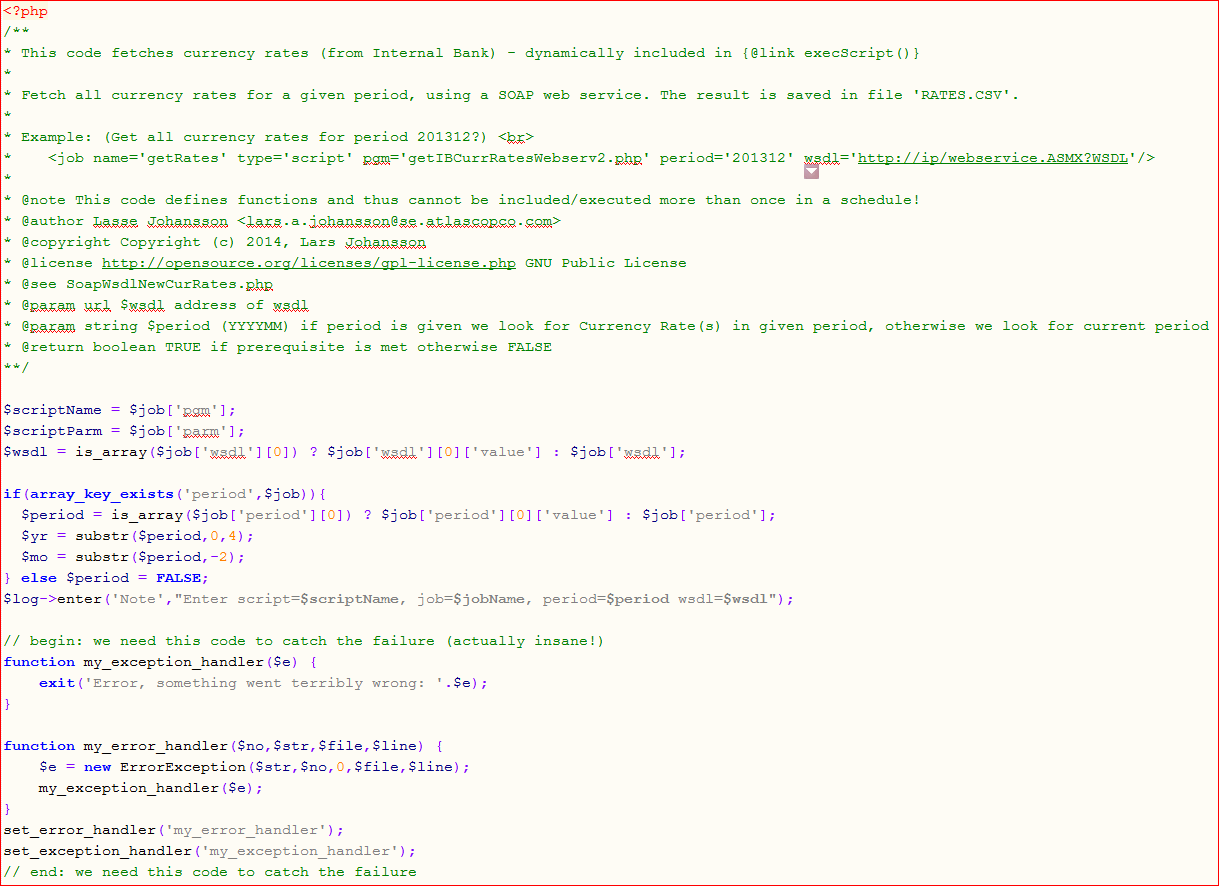
The <prereq> calls SoapWsdlNewCurRates.php:


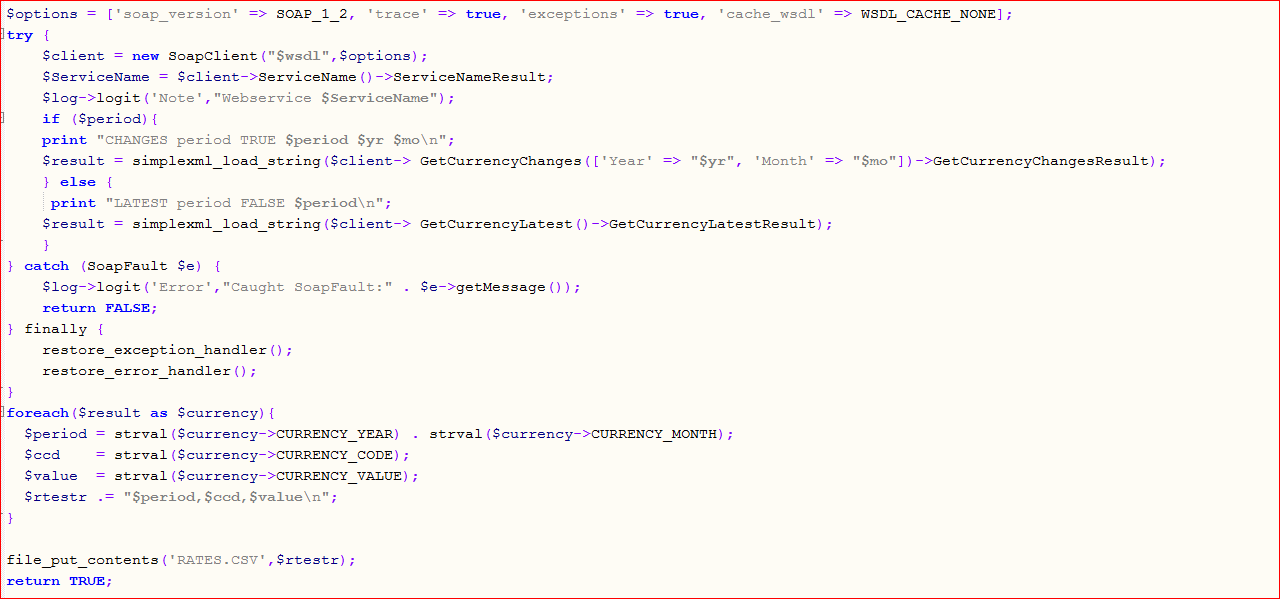
The job getRates calls getIBCurrRatesWebserv2.php:
Comments to the code. I had to write my own error and exception handler to catch error in the SOAP client. This should not be necessary, maybe I did something wrong.

As you see it’s dead simple to consume a SOAP webservice, just point to the WSDL and setup the parameters and call the method you are interested in. This web service test is a success and I will definitely explore web services as an integration tool. I’m already experimenting with Nodejs/HAPI creating REST APIs to the Data Warehouse. I wouldn’t be surprised if I start creating Web pages one of these days:)

2013-09-23

Splitting XML-reports zip & CIFS copy them to Windows

The other day I had a meeting with the project manager for an application that receives files from the Data Warehouse . The procedure for sending files to this application is interesting. First we create a complex XML file, then we zip it and lastly we connect to a Windows server share and copy the zip file. Three jobs to create the file, zip it and send it. The first job creates the XML file by execute a SQL Select and then hand result over to the converter  sqlconverter_xml02.php .


The second job zips the output file report0.xml.

The third job ships the zip file ItemMessage.xml to the Windows share:

The job navettiCopy2WIN.xml mounts the windows share as a CIFS file and the copy the zip file to the share and finally unmounts the Windows share:

 If you follow the init actions  you see how it’s done. Note I put in a sleep before unmount, in the past we have had some timing problems. If something goes wrong we execute exit failure .

XML wrong tool for data-interchange.

This job schedule is complex and I was not happy when the project manager of the receiving application told me ‘ The file is too large, can you please chop it up in smaller chunks ’. It’s probably their XML parser that cannot cope with large input. Most XML encoding/decoding I’ve seen is done in memory, so very large XML files tend to exhaust RAM. Actually XML code large data streams is a bad idea since XML encoding is verbose and parsing inefficient. I had problems with my SQL to XML conversion. First I based it on PHP simplexml  but when I exhausted the memory, I took the very bad decision to create my own XML coder sqlconverter_xml02.php (see above), it’s a piece of crap but it works. But I should have said no to large XML data-interchange, Google Buffers or CSV or even JSON are better alternatives.

Job Iterator to the rescue.

Anyway to make the other application work I had to split the XML file. Due to the XML mess I thought the split would be problematic, but after some thinking I realized I could use a  job iterator  and it turned out to be very easy to chop the file. The XML converter sqlconverter_xml02.php do not append the result to an existing file but creates a new sequenced numbered file. If you look below you see the target for the sqlconverter is  ItemMessage . The sqlconverter_xml02.php will name the first result file ItemMessage 0 .xml, the next ItemMessage 1 .xml etc. Subsequently the zipfiles job sweep them all up by the glob wildcard ‘ItemMessage * ’. This test was  done in minutes and worked right out of the box. In production the iterator would be SQL generated based on the actual result size.

First I created a job iterator <forevery> with offset and limit for each chunk, then I added the limit clause  to the SELECT statement and changed the SQL target to ItemMessage. (This SQL converter adds a sequence number to the filename if the file already exists.)

Then I just had to slurp up all created output tables in the zip job and send the zipfile to the Windows share.

If you scrutinize the schedule XML  you find there are some functionality under the hood. I’m still very happy with my PHP job scheduler  and the Integration Tag Language.

I end this post with the zipfile.php  script. The ZipArchive and Zipper classes I found somewhere on the net but I forgot to credit the authors, if you know who should have the honor for these classes please tell me.

$ziplib = fullPathName($context,$job['library']);

$ziplibcreate = $job['create'];

$log->enter('Info',"Zip library=$ziplib, create=$ziplibcreate");

$zip = new Zipper;

$ok = $zip->open("$ziplib", ZipArchive::CREATE);

if ($ok === FALSE) {

        $log->logit('Error',"Failed to create/open zip library=$ziplib, create=$ziplibcreate");

        return FALSE;

}

foreach($job['file'] as $finx => $file) {

  foreach (glob($file['name']) as $globfilename) {

      if ($file['name'] == "$globfilename") $localname=$file['localname'];

      else $localname = '';

      $path=$globfilename;

      if ($localname == '') {

              $path_parts = pathinfo("$path");

              $localname = $path_parts['filename'].'.'.$path_parts['extension'];

      }

      if (is_file($path)) {

          $log->logit('Note',"Zip $path into $localname");

          $zip->addFile("$path", "$localname");

      } else {

          $zip->addDir("$path");

      }        

  }

}

$zip->close();

$_RESULT = TRUE;

return $_RESULT;

class Zipper extends ZipArchive  {

    public function addDir($path) {

//        print 'adding ' . $path . "\n";

        $this->addEmptyDir($path);

        $nodes = glob($path . '/*');

        foreach ($nodes as $node) {

            print $node . '<br>';

            if (is_dir($node)) {

                $this->addDir($node);

            } else if (is_file($node))  {

                $this->addFile($node);

            }

        }

    }

} // class Zipper

2013-01-17

MD_STOCK_REQUIREMENTS_LIST_API performant bulk use

Stock figures; what is in stock and what is available is a challenge in any ERP system. You should not calculate stock figures yourself but use an available function or API. In SAP I have used BAPI_MATERIAL_AVAILABILITY, but now I learnt MD_STOCK_REQUIREMENTS_LIST_API is a better RFC function for this.
It is simple to set up a job in ITL (Integration Tag language) that extracts the stock figures.
This job selects the materials (from a MySQL table the <forevery> job iterator) we like to fetch stock figures for. The job runs the MD_STOCK_REQUIREMENTS_LIST_API for each material and creates a MySQL database table if not exists for the E_MDSTA output and loads the data. If the table exists it is truncated prior to loading.
This job does the work correctly, but it took +70 minutes for 23000 materials . The problem here is that the SAP part of the job is iterated once for each material, it means log on to SAP extract the data and then log off from SAP and all this sequentially. This takes an awful long time (+70 minutes). The best way to solve this is to make an ABAP RFC to do the job. But this time we will to do this without ABAP coding.  
First we like to parallel process the materials in chunks, that is easily fixed:
Adding chunksize and parallel attributes chops the <forevery> array into 1000 row chunks and parallel process them but not more than 10 at a time. This do not however fix the problem with logging on and off to SAP for each material. This can be fixed either by introducing initialization  and termination routines to the <forevery> job iterator or create a piggyback iterator. The piggyback iterator is the simplest solution and requires no PHP coding.  
Now we have a job that chops up the <forevery> into chunks and parallel process each chunk, but this time the job iterator is pushed down to the SAP communicator sap2.php, which now only log on once for the entire chunk. But there is a snag, since we are parallel process the chunks we cannot truncate the target table in this job. We must create a truncate job that we run first.
And that is what this job does. The <prereq> statement intercepts execution if the @TABLE not exists in MySQL. (It would be nice with ‘TRUNCATE IF EXISTS’ command in SQL).
And that’s it, now we extract stock figures for 23000 material in less than 8 minutes, without any ABAP code. This could most likely be optimized below 5 minutes, (see ‘ when fast is not enough ’).
Mixing iterators can create some amazing functionality. If you take a close look at the example above you will find there is quite a lot of functionality packed in there with little code. Creating a job for each chunk with job templates is an alternative, but it is harder to control the parallel processing.
If you like this post I suggest you also read:
My series on Integration Tag language ‘ Job Scheduling with PHP 1-4 ’.

2012-05-06

Job scheduling with PHP - 4

In my previous post about Job scheduling with PHP , I described two entities the context and the schedule. The context is where all configurations and descriptions of source systems go. The schedule is the entity we schedule for execution. The entity where we describe the job we want to do is called job. Jobs are chained together in schedules and can be included in a schedule from a job library or explicitly declared directly in the schedule. Before we look at the job I need to explain return codes.

Return Codes

This is a bit  complicated, if you are not for details go directly to Summary .

Previous in my  posts on job scheduling with PHP I have explained why I use Boolean return codes (with a few exceptions). Normally you declare a schedule with mustcomplete=’yes’ , which means execution stops if any return code is FALSE. This is what you normally want, stop at point of failure, correct and rerun the  schedule.  But sometimes you need to cleanup or automatically fix the problem by executing error correcting jobs or you like to build schedules with logic like ‘if month end run job allocateNewMonth’. You do this by prereqs, a prereq is basically a Boolean gate that is either open or closed, a job prereq determines if a job should execute or not, if the prereq is FALSE the job is bypassed. This means that the result of a job is not strictly Boolean, it can successfully execute, fail or be bypassed. The ‘bypassed’ condition defaults to TRUE/success, you can change this by bypassed=’false’  in the schedule.

To allow for failures you turn off normal error checking by stating ‘ mustcomplete=no ’ in the schedule, then all error checking must be done explicitly in the schedule.    

Summary:  Job return codes are Boolean. If a FALSE return code is detected execution of the schedule is intercepted. This default behavior can be changed.

The Job Iterator

How many times must a job execute  to become a success? In most job control systems I have seen the answer is ONCE only. In my job scheduler the answer is - it defaults to zero or more times . By default a job is executed ONCE.  The job iterator determines how many times a job executes. The job iterator is a table and the job is executed once for each row, the job iterator is also a placeholder for symbolic variables a.k.a. @tags. Job iterators are immensely powerful, but for now the job iterator determines how many times a job executes and can contain @tags.  

The job iterator is declared by the xml tag <forevery> within a job.

The Job

The job is declared by the xml <job> tag.

A job is a unit of work consisting of five optional execution elements:

1.             init actions; (operation system commands) executed prior to the job type action.

2.             the job type action; which is an SQL script or a PHP script or function.

3.             nested jobs.

4.             exit actions; (operation system commands) executed after the job type action.

5.             guard action; a php script that executes in case of unsuccessful excecution of 1,2,3 or 4.

Job prereqs can be used to fine tune execution logic.

The example

Now this may seem awfully complicated but it is not. You only add what you need and that is almost always only an SQL script or a PHP script. Does this mean I always have to create SQL and PHP scripts? Yes and No. You write SQL scripts, but very seldom PHP scripts those you need are already written, e.g:

I want to create an HTML table report and mail it to Kalle Kula. The data is in Mysql table mytable.


This schedule consists of 2 jobs.

The first job creates the report formatted as HTML. The second job mails the job with the help of the prewritten PHP script sendmail.  

There are two tags in there THETABLE points to the result HTML table produced by job 1, and the second tag THECSS point to a prewritten CSS template file.

Now suppose Kalle tells us, ‘ Please send the data for sales area ‘uppsala’ to my colleague Peggy Piggelin and please send the reports as Excel sheets ’. We have to do some changes to our schedule, these changes can be done in several ways. I show you one way to do it:


As you can see we have added a dummy  job with a <forevery> job iterator which consists of two rows with the columns NAME,EMAIL and SALES areas. In this new dummy job we execute the two original jobs, first for row one in the iterator then for the second and last row. To change the output from an HTML table to an MS Excel sheet we only changed SQL converter.

In real life you store the recipients in a database table and create the job iterator with an SQL query. The report sql queries are probably not hard coded in the job but stored in files in a suitable directory.

The post PHP, MySQL, Iterators, Jobs ,Templates and Relation sets , explains templates and shows alternate iterators.

The post PHP parallel job scheduling - 1  explains how you can parallel execute jobs.

Other Examples can be found here .

PHP code

I end my post about my job scheduler by displaying sqlconverter_GoogleDocs01.php

This code uploads the SQL result table to Google docs. I think this is very cool : )

2012-04-30

Job scheduling with PHP - 3

In a previous post Job scheduling with PHP - 2  I introduced the three main XML scripts my PHP job scheduler use for defining scheduled events. In this post we are going to take a more detailed look at the context  and the schedule  scripts.
In the next post Job Scheduling with PHP - 4  I will describe the job XML script and the job iterator , which is the most interesting feature of my job scheduling system.

The context

There is not so much to tell about the context. it is the master script of the config library and as the name suggests it sets the context for the job scheduling.
The <prereq> tag contains boolean statements that must evaluate to TRUE for execution to commence. Most of the other tags in there are self explanatory, it is declarations of files and databases the scheduler use.
An example of a context script

The schedule

The schedule XML script define a scheduled instance or a unit of work you submit for execution. The schedule defines a chain of jobs, run time parameters, prerequisites, alert lists, logging  how to interpret the success of job executions etc. There are a lot that goes into a schedule. Here I will discuss the basics and little more. In the previous post I ended by running an empty schedule, which is my scheduler version of ‘Hello, World’. Here is a more verbose schedule.
The control_day schedule contains a lot of things I will explain the most important:
I start from top:
‘mustcomplete=’yes’        -  all actions must be successful otherwise executions is aborted
 notify=’admfail.xml’        - after execution those in the list will be notified depending on the result
<variant>                - defines runtime parms e.g. sap=acta_prod defines a SAP subsystem
<prereq>                - boolean conditions that must be true for execution to commence
<job>                        - job declarations
<exit>                        - opsys commands executed after  the job have executed
wait=’no’                - spin off the command and proceed with next task
parallel=’yes’                 - is a hint to scheduler execute in parallel (fork) if possible
<init>                        - opsys commands executed before  the job have executed
This schedule is a production schedule and it is kicked off from Cron via a shell script:
Here you see how the control_day schedule is kicked off from a bash shell script.
As you see my job controller starts by invoking a PHP script scriptS.php , (this is not a good name, but it hangs on from my very first PHP script which I named scriptS where S stands for Start ).   I end this post by showing the the scriptS.php, I left out the initial documentation.
(In Job Scheduling with PHP - 4  I will describe the job XML script and the job iterator.)  

scriptS.php

2012-04-22

Job Scheduling with PHP - 2

Background 2

In my previous post Job Scheduling with PHP - 1  I described the basics about job scheduling in general. Here I write about the background and the underlying design principles for my job scheduling system written in PHP.

I created my job scheduling system for a Business Intelligence BI System. An important process in any BI system is Extract Transform & Load (ETL). The ETL process is background job scheduling. Good scheduling is essential for BI systems. I didn't have any funds for my BI project so I had to use existing (scrapped) hardware and Free Software. I mentioned in my previous post I was (still am) not very impressed by Job Scheduling systems on the market. I am a programmer by trade and I had used scripting languages for controlling processes before. I looked around for software to use, and Linux and MySQL was easy ones to pick. A programming language was harder to find, first I looked for ReXX my scripting language par preference. But I couldn't find ReXX in Linux, the languages I found were PERL and PHP. PERL was the better language, my impression of PHP was a tool for simple Web apps. But I couldn't resist the challenge to use PHP for advanced background processing. I did the first ETL controller in two  crude simple PHP scripts.  scriptS.php (S as in start), and scriptF.php  (F as in function) where I stored the functions used in scriptS.php. All ETL processes were hard coded  and everything was very primitive, but it worked pretty well. But as the BI system grow, it became clear my two scripts were a dead end, my hard coded scripts were not scalable, I had to go back to the drawing board and begin from scratch again.

Redo and do it right.

By now (2005-2006) Object Orientation had arrived in PHP, I'm not fond of OO programming, but a logging subsystem is perfect to objectify, so I learned PHP OO by creating a logger class before I started design version 2 of my job scheduler. Next I disconnected all configuration and job definitions from the PHP scripts. I wanted a strict but extendible syntax that was easy to parse. This was an easy pick; XML was the obvious choice, and PHP had a very simple and capable enough XML parser simpleXML. Now I had to define the environment , the scheduling and the jobs.

The context


The environment defines execution elements like databases, programs, directories etc. all is defined in XML scripts, the main context script  points to other XML scripts defining the total execution. Here you see a <sap> tag pointing to XML script defining a SAP system. The <prereq> are Boolean statements that must be true.

The Schedule


The schedule XML script defines a  chain of jobs  that is scheduled for execution with or without dependencies.  Variant define startup parameters and the first job point to an XML script 'exp8_generate_iterators'.

The Job

                 ...

This job XML Script defines the execution of series of  SQL statements.

The Execution

Having laid a sound foundation with three well defined entities (context, schedule & job) and a logger, I also needed an execution plan for my scheduling system. I decided to have divide execution into three phases :

  1. Read and parse all XML scripts and syntax check. And check prerequisites i.e. access to input files and subsystems like MySQL , predecessor conditions etc.
  2. Create the execution environment, it is a directory structure where all things from the execution of a schedule are stored, e.g. log files
  3. The actual execution of a schedule.

Phase 1 creates  an execution tree which basically is the parsed XML files into a PHP array structure. This tree is passed to phase 2 where more 'things' are added to the executions tree as the execution environment is created. This environment is then passed to phase 3, which then executes the schedule job by job and records the outcome of each job into the execution tree.

This is a schematic view of a schedule execution (the picture is old and some entities have been renamed).

Design patterns

I often use my own Garbage In - Garbage out  design pattern which means all not recognized is treated as noise and defaults are non destructive. This design pattern is both code friendly , the code do not have to consider unknown parameters etc, and user friendly  you do not need to know all details, try the software you will not destroy anything by misspell a parameter or leave something out.

But you have to give defaults some thoughts, they should be non destructive and sensible. This is actually quite hard. I’m sure you many times have seen idiotic defaults.

Another design pattern I often use is something I invented years ago when I did large systems in assembler language. I posit all goes wrong use boolean FALSE return code and return as soon as I find something wrong, this gives submodules often with many FALSE returns and only one TRUE or non-FALSE return at the end. If you are careful and design your submodules or functions with minimal side effects, you can often avoid cleanup code. The caller either deals with the false return code or exit himself with the FALSE return code. This design pattern gives flat, efficient and robust programs.

Return Codes

I already stated I prefer a simple boolean return code structure TRUE  or FALSE . Either an action is a success or not, black or white if you wish, no gray zones. You probably have seen other return code schemes. For reason of the branch on count  assembler instruction very many return code schemes is based on zero=success, 4=remark,8=warning,12=serious warning etc. This code scheme is not only confusing, error prone it is also out of sync with modern computer languages where zero=Boolean FALSE and everything else is Boolean TRUE. Multi value return code schemes may also  force you to write code like if not ok then ok else not ok or even more horrid constructs.

For a job scheduling system return codes are very important, jobs are dependent of predecessor jobs, errors must be fixed in successor jobs, you must be able to set up guards that kicks in when things go wrong. A simple return code structure is a boon not only in the code of the of the job scheduling system itself, but also to the job scheduling.  In my system a schedule can only successfully execute or fail execution  and the same goes for the jobs or almost.

In job scheduling you have to deal with the situation where a job is bumped over due to preconditions not met. Is that a failure or a success? IBM’s Job Control Language treat that as a success. This may seem absurd, but the opposite may be equally absurd, it depends entirely from what angle you entering the problem of a bumped over job. Even considering non executed jobs is a simplification, there are more things to consider when deciding the outcome of a job.

My defaults - all jobs must execute successfully, bumped over jobs are considered a success the schedule execution is intercepted when a failure is detected  covers more than 95% of all job planning as long as you run one job after another single threaded, when you run jobs in parallel things get more complicated.

Parallel processing

Remember I wrote Job Scheduling is important for the BI ETL process? BI systems contains large amounts of data and imports large amount of data via ETL processes, parallel processing to cut ETL execution time short is essential for BI systems. My job scheduler deals with parallel processing in basically two ways one by parallel process jobs and cut jobs up in smaller pieces/chunks. This I have described in when fast in not enough , in parallel processing of workflows  I described parallel execution in detail.

Now parallel processing and multi threading is crude and awkward in PHP, but it can be done.

This and more I will try to write some more posts about. I end this post with the execution of an empty schedule. This is how this empty.xml schedule file looks:

<?xml version='1.0' encoding='UTF-8' standalone='yes'?>

<schedule/>

Remember what I wrote about defaults, non destructive and sensible, here we have quite some defaults to fill in. Here we go:

What can be more appropriate for a default job than to TTY type contents of the little red box in the middle of the log display.

Note the first line; The Job Scheduler still start with the scriptS.php  module.

I hope I will be able to continue  to write about my PHP job scheduler.

Some examples can be found here .

2012-04-21

Job scheduling with PHP - 1


Background

I will try to write some posts of a job planning system I have written in PHP. In this first post I give a background to job planning and job scheduling.
I have partly been working with computer  operations my entire life, so it feels anyway.  Job planning and supervision is an important part of computer operations.  By Job I mean a planned background   task, that do some work in a computer, most often a job is part of an application, like import sales orders from another application or automatically send requirement forecasts to suppliers.

Job scheduling is complex.

If you like to create a process that starts by import Customer Sales Orders and ends with mailing out Purchase Orders of components to your suppliers, there are a hell of a lot of things to do from inbound sales order to outbound Purchase Order. There are many dependent tasks that must be carried out before the Purchase Order is produced. These tasks and dependencies must be defined in a Job Scheduling System.  If we make this extremely simple we create three jobs.

  1. First we create a  job for Sales Order Intake.
  2. Then a job for Material Requirement Planning , (calculate how many components missing).
  3. And at last a job to mail out Purchase Orders for components missing.
With only these three jobs at lot of questions arises. E.g. what shall we do if there is no Sales Order? Is this an error? Shall we notify someone? By mail? SMS? Twitter? Shall we execute the next step(s)? What do we do if there is a problem with a Sales Order? Shall we run this job on Saturdays? If the Sales Order application is delayed shall we wait? If so for how long?
If our database server is down what should our three jobs do? If the mails system is down? Etc.
There are endless possibilities that background jobs go wrong one way or another. In a Job Scheduling System you must be able not only to describe your processes but also alternative actions, notifications, error corrections and relation to other processes or scheduled events.

When I created a Business Intelligence system some years ago I decided to build a job scheduling system of my own based on my experience of computer operations. I never worked with a Job Scheduling System I really liked and I always thought I could do better. As a matter of fact I thought I could do a lot better. Job Scheduling systems I worked with have been to limited, awkward, inflexible, poor plugin capability, bad social skills i.e. do not communicate with other job scheduling systems the list goes on and on. Lately I have seen graphical Job Scheduling Systems, and they are probably the worst. First I do not like point-and-click programming you miss the detailed knowledge of what you are doing, second the graphical interfaces cannot do everything necessary. Too often you end up ‘this cannot be done’ or ‘for this task you must use the TTY interface’.  I do not want to give explicit examples but for those not involved in job planning believe me, there exists a lot of ‘limited’ job planning tools on the market.

In the post Job scheduling with PHP -2  I will describe my Job Scheduling System. Here you find some examples.