2015-11-15

Extracting SAP projects with BAPI - 2

In the previous post I described how we cut the time of extracting projects data from SAP. In this post I will show the new improved workflow coded in Integration Tag Language where workflows are coded in schedules. The first part of the project's schedule looks like this:


This is just initialisation of constants and logic needed for the execution of the schedule. The second part:


Extracts the PROJ table from SAP and creates an iterator with all projects. The last of these jobs ‘generate_driver’ creates a PHP array called driver0 which is the iterator used to drive the BAPI jobs. The first set of BAPI jobs are the quick ones that runs on less than 10 minutes:
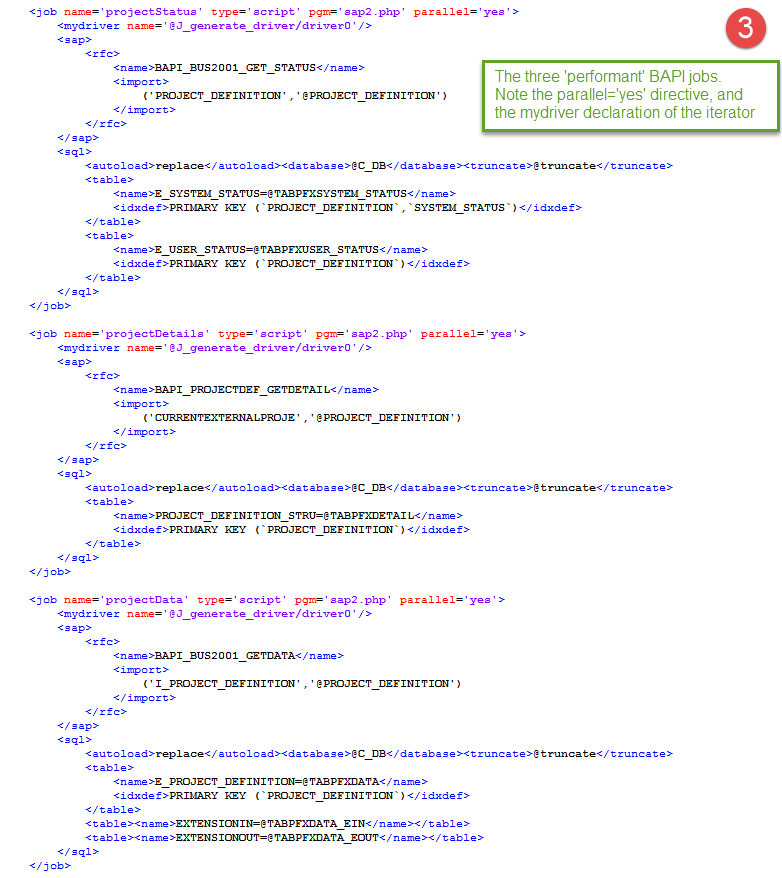

These jobs run in parallel, you only insert a parallel=’yes’ directive on the job statement. The iteratorn from the generate_driver job is declared by the <mydriver> tag and iterates the BAPI once for each project in the array0 iterator. The id of the project is transferred via the @PROJECT_DEFINITION variable, as you can see inside the <rfc> section. In the <sql> section the wanted tables are declared, default are all tables, BAPIs often creates a lot of ‘bogus’ tables so we explicitly state which tables we like to import to the Data Warehouse. The next job is a bit more complex it is the long running BAPI_PROJECTS_GETINFO job:
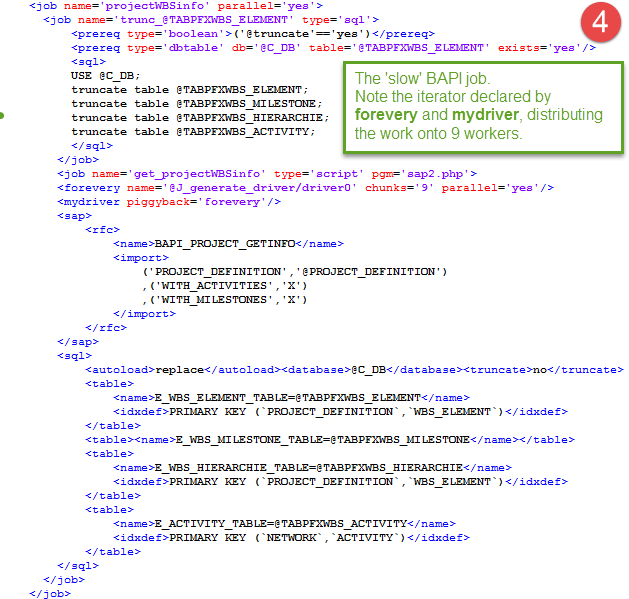

In part one we decided to distribute the workload over 9 workers, by doing so we need to truncate the tables upfront since we do not want our 9 workers to do 9 table truncations. First we create a dummy job as a container for our jobs, which we declare parallel=’yes’ so the job run in parallel with the preceding jobs. Inside the dummy job there is a table truncate job and subsequently the BAPI extraction job. Here the iterator array0 is defined with the <forevery> tag, the iterator is split up in 9 chunks which all will be executed in parallel. The rows in each chunk are transferred as before by the <mydriver> iterator which is given a chunk by the piggyback declaration. If you study this job carefully you will see there are some very complex processing going on, if you want a more detailed description I have written a series of posts on parallel execution. I am very happy about the piggyback coupling of the iterators, by joining the iterators a complex workflow is described both succinct and eloquent.
The 5th and last part of the schedule shows a job similar to the one just described, this time we only need to run the BAPI job in two workers:
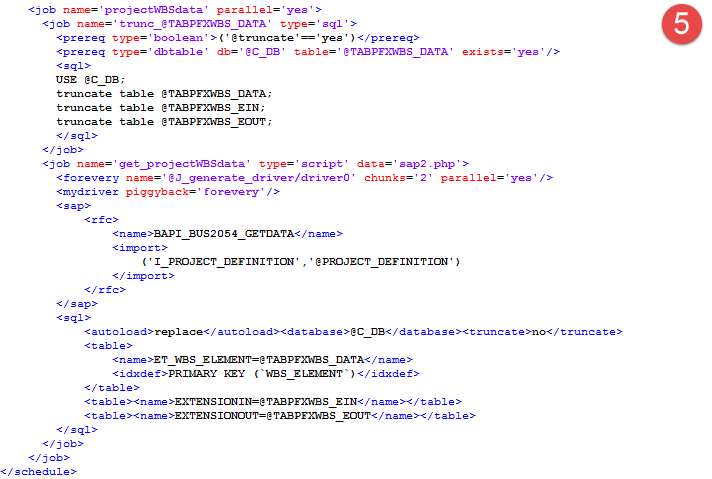

If you take the time and study this ITL workflow you will find there are some advanced parallel processing in there reducing the run time from about one and an half hour to less than 10 minutes. But so far we have used brute force to decrease the run time, by applying some amount of cleverness we can reduce the time even further and make it more stable. I hope to do this another weekend and if I do I write a post about that too.

Extracting SAP projects with BAPI - 1

Some years ago I was asked to extract project information from SAP for reporting/BI purposes. I decided to base the extraction solely on BAPIs. I wanted to test the BAPIs thus avoiding writing ABAP code and/or tracing what SAP tables containing project info. It sounded like a good strategy no SAP development just clean use of SAP premade extraction routines.  It turned out to be quite a few BAPIs I had to deploy for complete extraction, first I started with the project list BAPI:
BAPI_PROJECTDEF_GETLIST to get all projects (if you are not familiar with BAPI extraction read this first). Then I just had to run all the other BAPI one by one for each project:
BAPI_BUS2001_GET_STATUS
BAPI_PROJECTDEF_GETDETAIL
BAPI_BUS2001_GETDATA
BAPI_PROJECT_GETINFO
BAPI_BUS2054_GETDATA
BAPI_NETWORK_GETLIST
BAPI_NETWORK_GETINFO
BAPI_NETWORK_COMP_GETLIST
BAPI_NETWORK_COMP_GETDETAIL
BAPI_BUS2002_GET_STATUS
BAPI_BUS2002_ACT_GETDATA
BAPI_REQUISITION_GETDETAIL
BAPI_PO_GETDETAIL


In the beginning it was fine running these BAPIs in sequence, very few projects only one company (VBUKR) using projects. Last time I looked it took about 30 minutes to run the routine, it was a long time but what the heck 30 minutes during night time it’s not a big deal. Last week I had a call from present maintainers of the Data Warehouse, “Your project schedule takes hours and hours each night. The code is a bit ‘odd’, can you explain how it works, so we can to do something about it”. To understand the ‘archaic’ code in the schedule first thing I had to do was to clean it up, replacing obsolete idioms with more modern code constructs others could understand. Then I split the original schedule into smaller more logical schedules, the first one consisting of:
BAPI_PROJECTDEF_GETLIST
BAPI_BUS2001_GET_STATUS
BAPI_PROJECTDEF_GETDETAIL
BAPI_BUS2001_GETDATA
BAPI_PROJECT_GETINFO
BAPI_BUS2054_GETDATA

took more than two hours to run.  A look into the projects data showed 16000+ projects belonging to more companies than I created the extraction for. Now we replaced the BAPI_PROJECTDEF_GETLIST with direct extraction of the SAP PROJ table selecting only the interesting company about 8000 projects and run the BAPIs in parallel  this brought down the execution time to about 1 hour 20 minutes. Analysing job statistics showed the three first BAPIs only took little more than 500 seconds each, BAPI_PROJECT_GETINFO 5000 seconds and finally BAPI_BUS2054_GETDATA about 1000 seconds. Distributing  BAPI_PROJECT_GETINFO on 9 workers and BAPI_BUS2054_GETDATA on 2 workers should make all BAPI execute in between 500 to 600 seconds. This is a balanced scheme and the execution time is acceptable, from over 2 hours to 10 minutes. In the next post I will show the new improved execution schedule.

2015-11-01

Understand the ISO 8601 date format

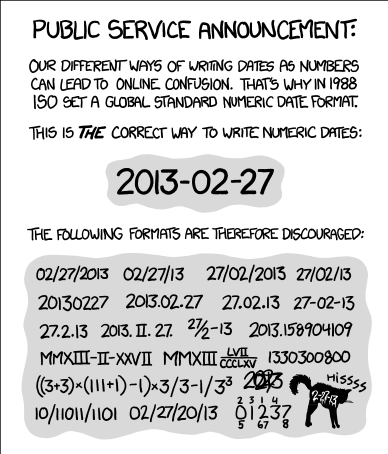
How hard can it be? It seems  to be incomprehensible hard for some to understand the ISO 8601 date format YYYY-MM-DD and acknowledge ISO 8601 as the international standard.
.


One example;  at the company we use Microsoft sharePoint collaborative software. As an american i.e. U.S.A company Microsoft is unaware of ISO standards e.g. date formats are national in sharePoint. The swedish date format in sharePoint is ISO 8601 since we swedes since long have adopted the SI/ISO standard. The US date format is not ISO 8601. The US sharePoint admins at the company are unaware of ISO and do not want to promote the ISO 8601 as default as they believe this is the swedish date format only, instead they use the US date format since they think the US standard is the world standard. If Microsoft could introduce the ISO 8601 as a recognised date format in sharePoint, it would be much easier for me to evangelize the benefits of using one recognised standard format as default for dates in the company. This will probably only happen after the Chinese have established a Chinese hegemony, their date format is sort of big endian in accordance with ISO 8601.


Good reading for programmers

Once in a while you stumble upon a great post, this one by Sean Hickey is also quite fun The evolution of a software engineer.

2015-10-25

Hello SUSE!

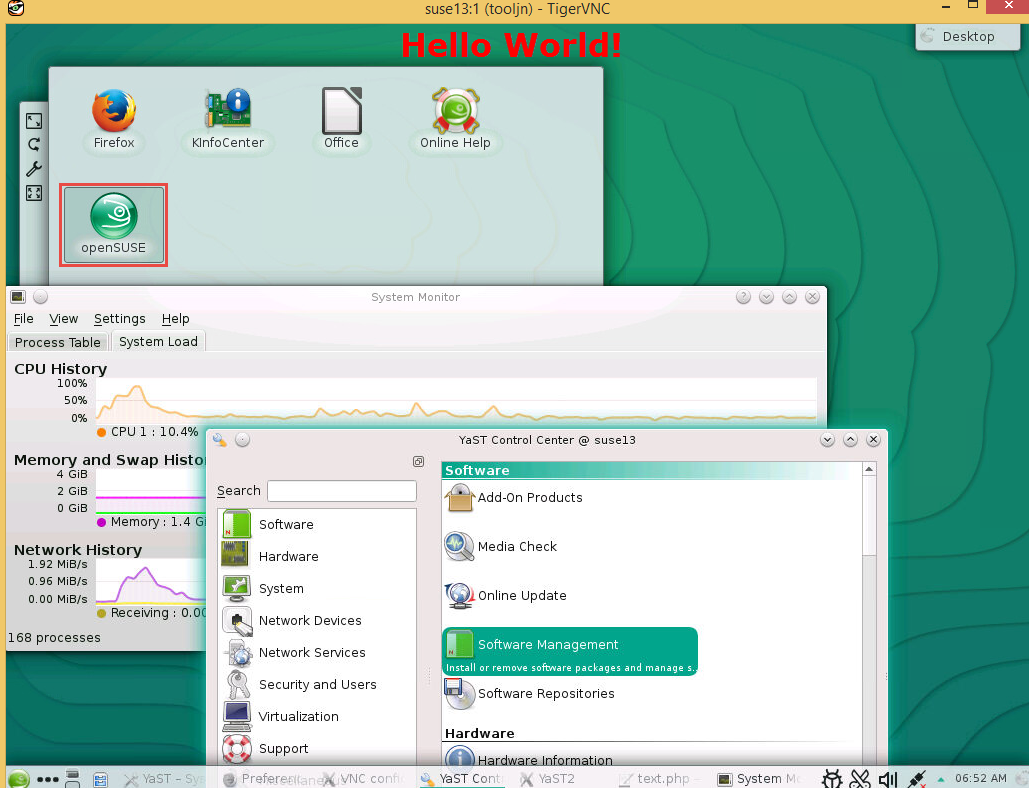
Today I logged on to SUSE Linux for the first time!
First I had to install a vnc server. I logged on with the help of putty and fired up yast in tty mode.
I installed tigerVnc, with yast it was a breeze.


Then I ‘vnc logged into’ SUSE, since it has a KDE gui I felt at home right away.

Now I ‘only’ have to create an ETL server for the Data Warehouse, this will take some time, since I have to do this in my spare time, it is sort of a hobby to me, I do IT architecture during work hours. I will blog about my progress.

2015-10-22

Data Warehouse upgrade

After procrastinated a general upgrade of the Data Warehouse for a long time we now have gone from Ubuntu 12.04 to 14.04. To my great surprise this upgrade seems to have worked well. We also painlessly upgraded MySql from version 5.5 to 5.6. We tried MySql 5.7 but found a number of incompatibilities, so we decided to wait with MySql 5.7 until we have ironed out any problem. We had a moment when we thought we had kissed the japanese DW satellite goodbye, after upgrading the server we restarted the server but it didn’t came up again. We had to wait for the guys in Japan to push the power button. But on the whole it was a smooth transition, about ten or so upgraded servers without any major issues.
After the upgraded Data Warehouse landscape have stabilized, we will also try to move our ETL server from Mageia to SUSE Linux. The Data Warehouse started on Mandrake Linux 2001 and continued on Mandriva and lately on Mageia. These Linux distros have served us well but now we will try SUSE not only for the hell of it, SUSE has a partnership with SAP and that might make the Data Warehouse more acceptable in the company. The sad story is nobody in the company knows what Mageia Linux is which makes the Data Warehouse kind of an oddball. SUSE Linux is more digestible for the IT community in the company. But we will try openSUSE not SUSE Linux Enterprise, after all the Data Warehouse was not formed after the  standard enterprise model.

2015-09-21

Curl and sharepoint authentication

Our sharepoint uses NTLM for authentication, it took me some time to figure that out. I access a sharepoint site from our Linux Data Warehouse environment using curl. Seems like curl can handle NTLM, but this is what curl says about NTLM.  

The NTLM authentication method was designed by Microsoft and is used by IIS web servers. It is a proprietary protocol, reverse-engineered by clever people and implemented in curl based on their efforts. This kind of behavior should not be endorsed, you should encourage everyone who uses NTLM to switch to a public and documented authentication method instead, such as Digest.

curl --ntlm -u userid  http://sharepointServer/thePathTo/Items